Navigating Novi
Your Quick Start Guide to Novi
Welcome to the new SNA member portal! This guide will help you get up and running quickly, manage your profile, connect with fellow members, and make the most of the site's resources.
How do I update my profile?
- Sign in to the member portal.
- Click your name or profile icon in the top navigation.
- Click the Profile tab from your dashboard
- Update your information as needed
- Save your changes when finished.
Add a professional headshot
- Upload a current, high-quality photo.
- Use a professional image that represents your practice.
- Square images typically display best throughout the site.
Update your professional information
Be sure your profile includes:
- Firm name
- Contact information
- Practice location(s)
- Professional biography
- Areas of focus and expertise
- Geographical areas served
- Website and social media links (if applicable)
Keep your information current
Members use the directory to connect and collaborate. Updating your information regularly helps ensure colleagues can find and contact you.
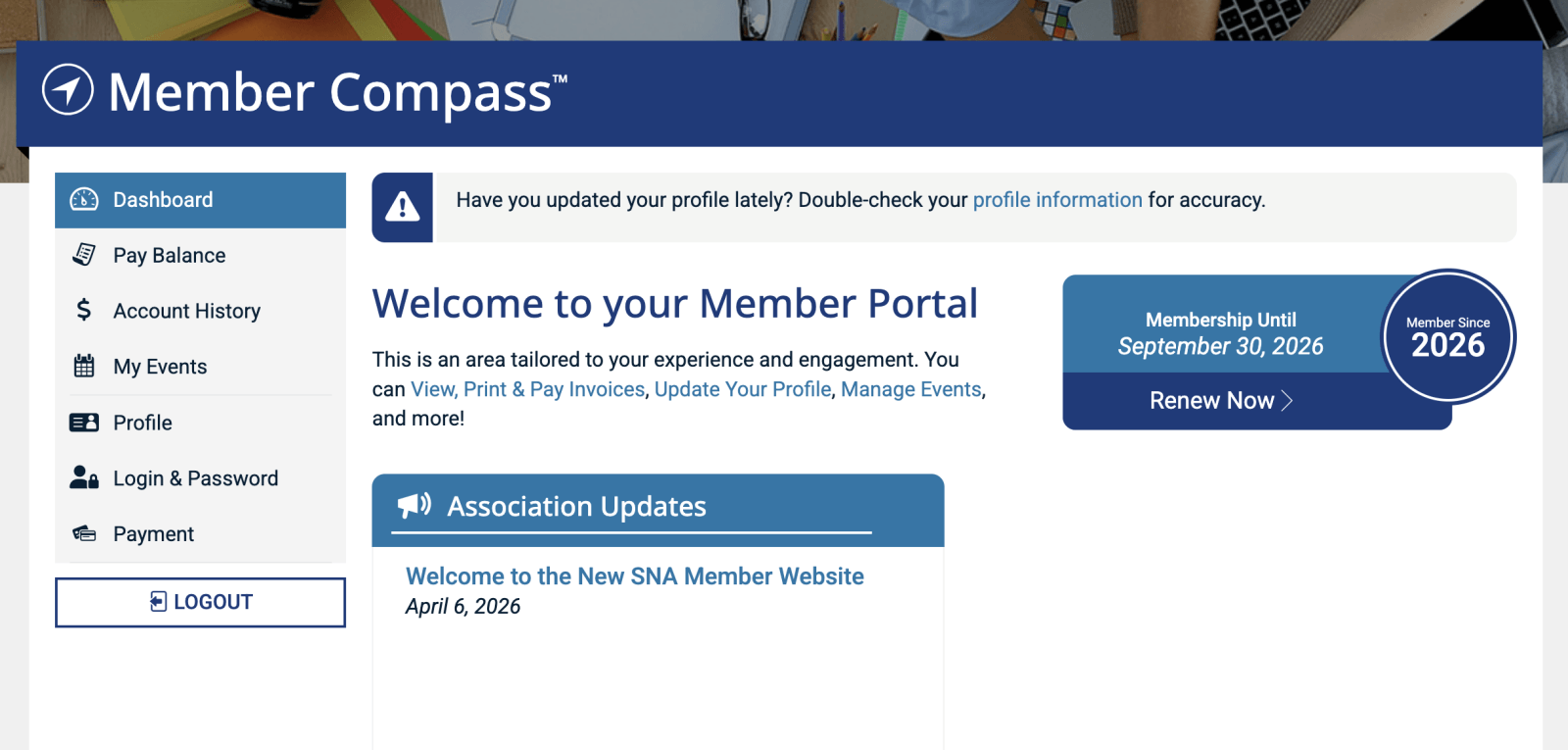
Your Dashboard: Member Portal
This serves as your toolkit to manage your account. It may also be referred to as 'Member Compass™'. From here you can view and update your information, renew your membership, and access your upcoming events.
Pay Balance & Account History
To pay open invoices, select the Pay Balance tab. Need to view past transactions or print an invoice? Go to the Account History tab.
My Events
At the top of this tab are any upcoming events you're registered for. From here you can update your registration details if needed, add the event to your personal calendar, and view event details. If you toggle to the next tab 'past events' you will be able to see an archive of the events you've attended. *Note that registrations before the 2026 Fall Meeting will not show up because they were not hosted in the new system.
There is also a link that will take you to SNA's Event Page for a full listing of upcoming events so you never miss a thing!
Updating Your Profile & Account
You will use the tabs Profile, Login & Password, and Payment to add and update your personal and firm/company information. Reach out to SNA staff if you need to make an update in a locked field.
Here is an overview of how to register for an upcoming event:
- Navigate to Upcoming Events, which can be found in the Member Resources drop-down
- Click the event you wish to register for
- Click the Register Now button
- Select your applicable tickets (Member Tickets, Social Event Tickets, Guest Tickets, etc.) and hit Continue
- Fill in the applicable attendee information and hit Continue
- If your registration has a balance due, enter your payment information in the Checkout section
Once the registration is complete, you will be able to access the details from your Member Portal.
How do I pay my dues?
-
- Navigate to your Member Portal.
- Select Pay Balances or View Your Invoices
- Review open invoices.
- Complete payment using the available payment options.
How can I view my membership status?
Your membership status, renewal dates, and payment history can be found within your account profile.
Member Directory
Use the directory to:
-
- Find fellow SNA members
- Search by name, location, or practice area
- Discover potential referral and collaboration opportunities
Armchair Chats
Armchair Chats provide SNA members with practical insights, professional development opportunities, and expert perspectives on topics affecting special needs planning, trust administration, advocacy, technology, practice management, and client service.
From the 'Member Resources' dropdown, you will find our Armchair Chats page where you can:
-
- Register for any upcoming webinar sessions
- Watch previous Armchair Chat recordings
- Download presentation documents
Events
Visit the Events section to:
-
- View upcoming meetings and conferences
- Register for events
- Access event information and updates
Resource Library
Explore member resources such as:
-
- Practice tools
- Educational materials
- Templates and documents
- Association resources
If you have additional questions not covered here, feel free to reach out to the SNA team.
We're happy to support you!
CONTACT US
We're happy to support you!
CONTACT US